
AI: Deterministic agent workflows with Pi
In my previous posts on orchestrating agents with herdr, chezmoi, and nvim and Pi - The extensible agent harness, I focused on the execution and tooling environment: decoupling long-running tasks into persistent terminal panes, driving Neovim over RPC, and building on a lean agent harness with an in-process TypeScript extension engine.
However, having visibility and sharp tools only solves half the problem. When you set an AI agent to work on non-trivial engineering tasks - such as rearchitecting an authentication layer, tracking down a subtle concurrency bug, or implementing a feature from scratch with tests - a deeper question arises: how do we ensure consistent process, repeatable quality, and potentially smooth team collaboration?
Without an explicit process model, autonomous agents can run into several failure modes: drifting off-topic, skipping verification gates, thrashing in unproductive editing loops, or losing track of earlier decisions when long sessions get compacted.
More importantly, it is not just about governing the agent; it is about establishing repeatable workflows that deliver consistently high quality. When engineering standards - such as requiring root-cause reproduction before patching, establishing clear acceptance criteria, and validating design decisions with human sign-offs - are codified into an executable engine, the entire team could benefit from a shared, dependable process.
Here is why I moved away from harness-neutral, prompt-based workflow skills, how
I designed pi-workflow-executor
as an authoritative, state-machine engine for Pi, and how deterministic
orchestration changes daily work.
The Limits of Prompt-Driven Workflows
My first attempt at structuring complex agent tasks was intentionally
harness-independent. In my dotfiles, I maintained a generic workflow-executor
skill
alongside declarative YAML workflows (feature-implementation, bug-fix,
interactive-planning).
The workflow definition declared states, artifact requirements, exit gates, and transitions:
initial: intake

states:
  intake:
    goal: Clarify scope and read existing codebase patterns.
    exit_gate: Scope agreed and requirements documented.
    transitions:
      - when: Scope clarified
        to: plan
  plan:
    goal: Create detailed implementation plan.
    exit_gate: Plan written and verified.
    transitions:
      - when: Plan complete
        to: implement
The theory was appealing: by presenting this YAML to the LLM inside a system
prompt or skill, the model acts as the orchestrator. It evaluates natural-language
predicates (when, exit_gate), records each step in an append-only Markdown
journal (workflow-log.md), and loops back when refinement is needed. Because it
was just Markdown and YAML, it ran equally well on Claude Code, OpenCode, Codex
CLI, or Gemini.
In practice, relying solely on in-prompt guidance highlights clear trade-offs. While foundation models excel at reasoning and synthesis within a given step, expecting an LLM to reliably track its own state machine over extended horizons can introduce noticeable friction:
- State drift and uncoordinated transitions: Under heavy context or cognitive load, models can lose track of the active state. They may occasionally skip phases (such as jumping straight into writing code before finishing requirements), or attempt transitions not declared in the workflow graph.
- Exit gate rationalization: When an exit gate specifies rigorous test verification or artifact creation, a model can rationalize that changes look sound without actually running the full verification suite.
- Context compaction impact: Complex engineering tasks often take dozens of turns. When context compaction truncates earlier messages to preserve token limits, the agent may misinterpret its own past log entries, re-running completed work or concluding prematurely.
- Refinement thrashing: If an implementation loop encounters repeated failures (such as a persistent compilation or test failure), models can get caught in repetitive edit cycles without a structured stopping mechanism.
- Fragile session resumption: Resuming a paused or interrupted session relied on the model parsing an append-only Markdown file. Drift or missing detail could make clean resumption harder to guarantee.
Prompting an LLM to follow a state machine works well for straightforward, short sessions. But as tasks grow longer and quality standards need to be maintained consistently across a team, separating the state machine from the reasoning engine becomes much more dependable.
Committing to Pi: Building an Authoritative Engine
Having selected Pi as my primary harness, I realized that chasing harness-neutrality had diminishing returns.
Pi’s minimal architecture and in-process TypeScript extension runtime make it uniquely suited for deep platform integration. Rather than asking the LLM to pretend to be an orchestrator, the state machine should be an external, authoritative software engine that governs the LLM.
Instead of inventing ad-hoc prompt strategies to guide an agent through planning or debugging, a dedicated engine provides a standardized, executable framework that guarantees (sort of) consistent quality.
To achieve this, I built
pi-workflow-executor.
Instead of treating workflows as loose suggestions, pi-workflow-executor
enforces workflow execution through four core pillars:
- ACID state persistence in SQLite (
.workflow/state.db). - Deterministic state transitions via dedicated agent tools.
- Interactive human approval gates and loop thrash guards.
- First-class terminal interfaces (slash commands, Pi UI dialogs, and a standalone dashboard).
                  ┌─────────────────────────────────────┐
                  │          Declarative YAML           │
                  │   (states, gates, transitions)      │
                  └──────────────────┬──────────────────┘
                                     │ resolves definition
                                     ▼
┌─────────────────┐       ┌──────────────────────┐       ┌──────────────────┐
│   User Prompt   │──────►│ pi-workflow-executor │◄─────►│   SQLite Store   │
│   or /workflow  │       │   Transition Engine  │       │ state.db (ACID)  │
└─────────────────┘       └──────────┬───────────┘       └──────────────────┘
                                     │
           ┌─────────────────────────┼─────────────────────────┐
           ▼                         ▼                         ▼
┌────────────────────┐    ┌────────────────────┐    ┌────────────────────┐
│ workflow_start &   │    │ Interactive Gates  │    │ Read-Only Journal  │
│ workflow_transition│    │ (ctx.ui.select &   │    │ workflow-log.md    │
│ tools for agent    │    │ herdr:blocked)     │    │ (one-way sync)     │
└────────────────────┘    └────────────────────┘    └────────────────────┘
The Architecture of Determinism
1. Authoritative SQLite State Store
The source of truth for all workflow runs is a local SQLite database stored at
<cwd>/.workflow/state.db.
The database tracks runs, state visits, loop counters, pending approvals, and transition history with strict relational integrity:
- Optimistic concurrency control: Every run carries an integer
revisioncounter. When an agent callsworkflow_transition, it must supply theexpectedRevision. If the revision does not match (due to race conditions or concurrent edits), the transition is rejected. - Automated one-way audit journal: Humans still need readable documentation.
Instead of letting the agent write whatever it wants to a Markdown file, the
engine automatically projects the database state into
.workflow/runs/<workflow>/<task>/workflow-log.md. The journal is strictly read-only for the agent; history cannot be hallucinated or rewritten. - Clean resumability and team handoffs: If you close your terminal,
reboot your machine, or switch branches, the active state, revision, and loop
counts remain intact. A teammate can pull the branch, run
/workflow, and resume the paused run immediately, picking up from the exact verified checkpoint with zero ambiguity.
2. Transition Gating via Dedicated Tools
In pi-workflow-executor, the LLM cannot advance to another phase by simply
saying “I will now proceed to implementation”.
Instead, the extension registers three tools:
workflow_start: Initializes or resumes a run, creates the database record, and returns the active state’s instructions.workflow_transition: Submits a transition request.workflow_list: Inspects active or past runs.
When an agent finishes working on a state, it must invoke workflow_transition:
{
  "runId": "feature-implementation-oauth2-auth",
  "outcomeId": "proposal_accepted",
  "expectedRevision": 3,
  "evidence": [
    "openspec/changes/oauth2-auth/proposal.md created",
    "pnpm test passed with zero errors"
  ]
}
The transition engine validates that proposal_accepted is a valid declared
outcome for the active state in the workflow YAML. If the outcome is valid and
all constraints hold, the engine commits the transition, increments the
revision, updates loop counters, and yields control back to the agent with the
next state’s goal and artifacts.
3. Circuit Breakers: Loop Thrash Guards
A frequent pitfall in autonomous coding is the endless refinement cycle. For
example, a state machine might loop between implement and verify:
states:
  verify:
    goal: Run test suites and verify exit criteria.
    transitions:
      - outcome: tests_passed
        to: complete
      - outcome: tests_failed
        to: implement
        max_retries: 2
If an agent encounters failing tests, it loops back to implement. If the agent
fails to resolve the failure after 2 iterations, the engine’s thrash guard
triggers. Rather than burning tokens on twenty doomed attempts, the engine halts
the run, records the blocker in SQLite, and prompts the user to intervene.
Keeping Humans in the Loop: Interactive Approval Gates
Autonomous execution without guardrails can easily lead to unintended side effects. High-impact milestones - such as approving an architectural proposal, deleting legacy modules, or applying database migrations - benefit immensely from explicit human sign-off.
In pi-workflow-executor, any transition can specify requires_approval: true:
transitions:
  - outcome: plan_approved
    when: User approves architecture plan
    to: task_breakdown
    requires_approval: true
When the agent attempts this transition, the engine intercepts the call, updates
the run status to paused, and presents an interactive TUI modal directly inside
Pi using ctx.ui.select:
Workflow 'interactive-planning' (oauth2-auth) requires approval to transition to 'task_breakdown'.
Reason: plan approved; break it into worker-ready tasks

1. Approve transition to 'task_breakdown'
2. Reject transition
3. Chat about it (ask question or discuss)
Selecting “Chat about it” opens an inline input prompt (ctx.ui.input). You type
your feedback, the agent answers your questions in chat, and once the discussion
concludes, the approval dialog is automatically re-presented. The agent cannot
bypass the gate, self-approve, or forge a signature.
Multiplexer Awareness with Herdr
When running inside Herdr (HERDR_ENV=1),
interactive approval gates integrate with your desktop:
- Desktop notifications: The engine spawns a detached, non-blocking call to
herdr notification showto alert you that an agent is waiting for approval, complete with sound and task details. - Status hooks: The extension emits
herdr:blockedlifecycle events. Herdr marks the pane as blocked, making it immediately visible in your workspace dashboard even if the terminal window is hidden.
Once you approve or reject the transition, the blocked state clears automatically.
Intermission: Cat Tax
Transactional state machines and ACID SQLite locking can get a little dry. To lighten things up, here is an exaggeratedly cute kitten monitoring the server rack and supervising the terminal:

Multi-Agent Orchestration & Sub-Workflows
Complex development tasks rarely fit a single agent persona. An agent that is good at high-level architecture planning is often suboptimal at writing repetitive unit tests, and having the implementer review its own code is an anti-pattern.
pi-workflow-executor supports multi-agent and hierarchical patterns natively.
1. Subagent Delegation (subagent:)
States can declare a dedicated subagent persona:
states:
  audit_code:
    goal: Review pull request diff for security and architectural regressions.
    subagent:
      agent: reviewer
      skills: software-engineering
    transitions:
      - outcome: review_passed
        to: merge
      - outcome: changes_requested
        to: rework
When entering audit_code, the orchestrator dispatches the task to the
reviewer subagent (leveraging pi-herdr-subagents to spin up a background
terminal pane).
The subagent works within its scoped boundary and delivers its artifacts. Once complete, the parent orchestrator inspects the deliverables, judges the exit gate, and commits the transition. Subagents never transition states directly. Authority remains strictly centralized with the orchestrator.
2. Hierarchical Sub-Workflows (invoke:)
Workflows can be composed recursively. For instance, the bug-fix workflow
invokes the debug workflow as a child unit:
states:
  investigate:
    invoke:
      workflow: debug
      inputs: { require_repro: true }
      entry: triage
    transitions:
      - outcome: debug_completed
        when: Child ended in done
        to: plan_fix
      - outcome: debug_aborted
        when: Child ended in abort
        to: abort
The child workflow runs with its own run ID and isolated SQLite record. When the child reaches a terminal state, the parent inspects the child’s final outcome and branches accordingly.
Visibility and Control: The Terminal Dashboard (pi-workflow-tui)
Because workflow state is tracked in SQLite, you do not have to parse JSON or inspect database tables to see what is happening.
The package includes pi-workflow-tui, a full-screen terminal dashboard built
with Ink:
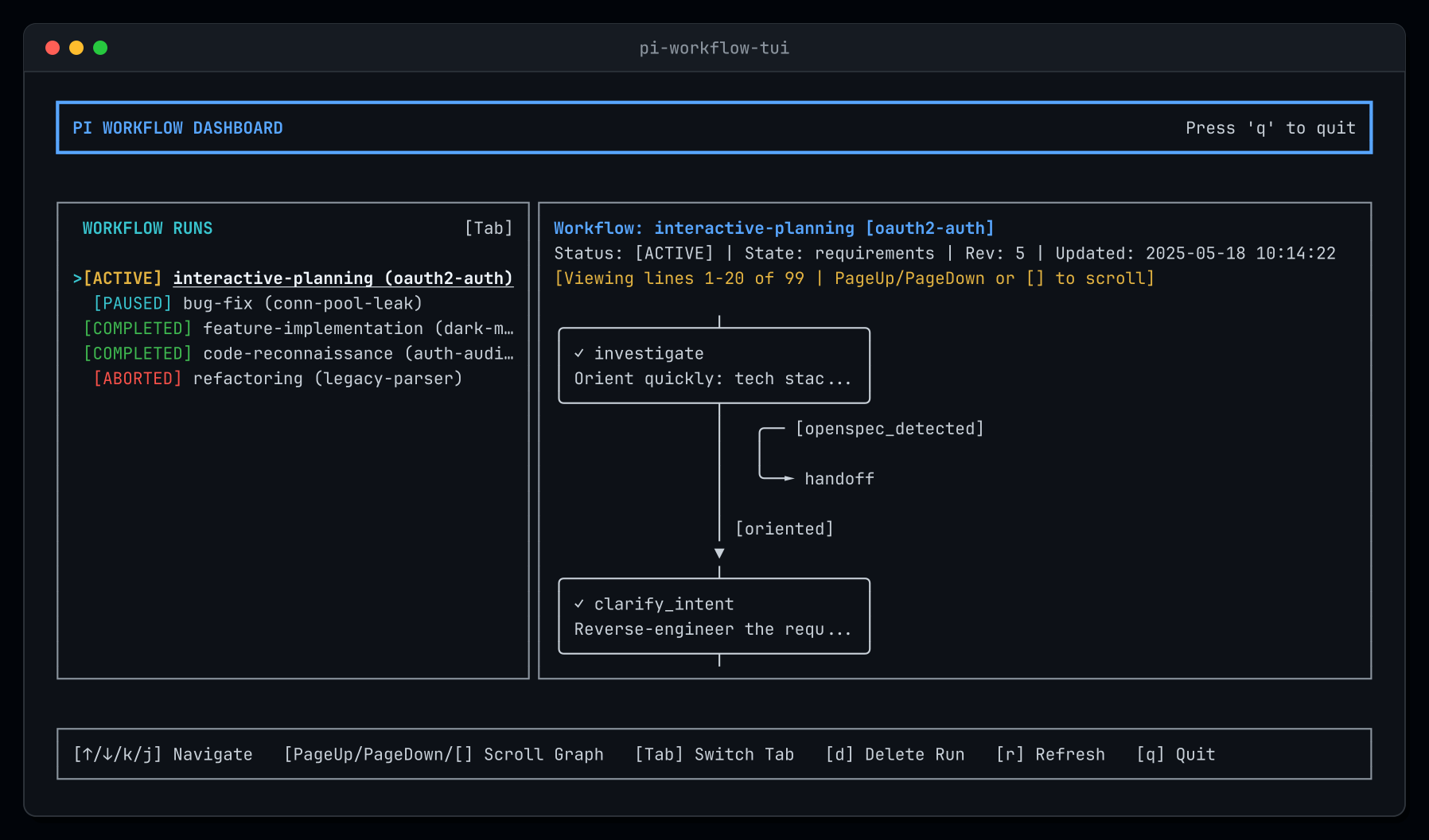
Key Dashboard Capabilities
- Split-Pane View: The left sidebar lists all workflow runs (
[ACTIVE],[PAUSED],[COMPLETED],[ABORTED]). The right pane renders an ASCII/Unicode directed state graph with depth-layered nodes and arrows (╭───╮,──►). - Live State Inspection: Visited states are flagged with
✓, and the currently active state is highlighted with► [CURRENT]. - Template Browser: Pressing
Tabswitches from active runs to defined workflow templates, allowing you to preview state machine topologies before running them. - Safe Run Deletion: Completed or aborted runs can be deleted by pressing
d. The deletion runs inside an immediate SQLite transaction that cascades through all child tables (transitions,state_visits,loop_counts,pending_approvals) and cleans up the run directory on disk. Active and paused runs are protected against accidental deletion.
Usability: Slash Commands and Natural Language
Starting a workflow should not require memorizing complex CLI incantations.
pi-workflow-executor supports both direct commands and natural language:
1. The /workflow Slash Command
You can launch any workflow directly:
/workflow interactive-planning design oauth2 authentication with refresh tokens
The extension parses the prompt, automatically normalizes it into a kebab-case
task slug (design-oauth2-authentication-with), and opens an interactive prompt
where you can confirm or edit the slug before starting.
Running /workflow with no arguments opens the interactive run selector, listing
all recorded runs for instant resumption:
Select a workflow run to inspect or resume:
- [ACTIVE] interactive-planning (oauth2-auth) - state: explore_approaches, rev: 5
- [PAUSED] bug-fix (conn-pool-leak) - state: verify, rev: 3 - waiting for approval
- [COMPLETED] feature-implementation (dark-mode) - state: done, rev: 7
2. Conversational Intent via workflow_start
You can also speak naturally to Pi:
“Fix the connection pool timeout issue using the bug-fix workflow”
Pi identifies the workflow intent and calls the workflow_start tool
autonomously. The tool derives the task slug, verifies the definition, creates
the SQLite entry, and launches the run without turn collision.
Bundled Workflows and Resolution Hierarchy
The package ships with 8 example workflows ready for daily engineering:
| Workflow | Initial State | Description |
|---|---|---|
interactive-planning |
investigate |
Requirements clarification, ISC criteria, approach exploration, and worker-ready task breakdown. |
task-implementation |
intake |
Implements a single pre-planned task from a plan artifact without expanding scope or re-planning. |
feature-implementation |
orientation |
Full feature lifecycle: specification, planning, implementation loops, verification, and archival. |
bug-fix |
debug |
Reproduces bugs, invokes the debug sub-workflow to isolate root causes, and applies verified fixes. |
debug |
triage |
Hypothesis-driven root-cause investigation without speculative code edits. |
code-reconnaissance |
orient |
Read-only codebase reconnaissance mapping patterns, architecture, and dependencies. |
refactoring |
goal |
Structural code improvements with strict behavioral invariance preservation. |
merge-review |
scope |
Thorough pre-merge code review checking correctness, security, tests, and conventions. |
Visualizing a Workflow: The bug-fix State Machine
To see how these declarative rules translate into runtime behavior, consider the bundled bug-fix workflow. It orchestrates the entire lifecycle from triage and root-cause reproduction through fix implementation, regression testing, and final integration:
stateDiagram-v2
    direction TB
    [*] --> debug

    state "debug (invoke child)" as debug
    state "plan (proposal & tasks)" as plan
    state "fix (implementation)" as fix
    state "plan_revision" as plan_revision
    state "verify (regression suite)" as verify
    state "integration" as integration
    state "done" as done
    state "abort" as abort

    debug --> abort: debug_aborted
    debug --> plan: debug_completed

    plan --> debug: diagnosis_invalidated
    plan --> fix: plan_ready

    fix --> debug: fix_invalidated_diagnosis
    fix --> plan_revision: fix_invalidated_plan
    fix --> verify: fix_implemented

    plan_revision --> fix: plan_reconciled

    verify --> fix: code_verification_failed
    verify --> plan_revision: artifact_validation_failed
    verify --> integration: fix_verified

    integration --> plan_revision: integration_failed
    integration --> done: fix_integrated (requires approval)

    abort --> [*]
    done --> [*]
This topology illustrates how non-linear engineering tasks become structured and resilient:
- Isolated child execution: The workflow starts by invoking
debugas a nested sub-workflow. It must prove the root cause and establish a reproducible test case before any production code is touched. - Controlled refinement loops: If writing the fix reveals that the diagnosis was incomplete or inaccurate, the engine transitions back to
debugorplan_revision. - Loop thrash guards: The cycles between
verifyandfixare protected bymax_retries: 2in SQLite, halting the run if the agent fails to resolve test regressions after two consecutive attempts. - Human approval gate: The final step into
donerequires human sign-off via Pi’s interactive dialog, ensuring changes are verified and intentional before the run completes.
Resolution Hierarchy
Workflows are resolved dynamically using a precedence order:
<cwd>/.workflow/workflows/<name>/<name>.yaml(project-local)<cwd>/.pi/workflows/<name>/<name>.yaml(project-local)~/.pi/agent/workflows/<name>/<name>.yaml(user-global)- Package bundled workflows
If you prefer custom workflows or want to disable specific bundled definitions,
you can configure .workflow/config.json locally or
~/.pi/agent/extensions/workflow-executor/config.json globally:
{
  "disabledWorkflows": ["refactoring"]
}
This resolution hierarchy makes workflows naturally collaborative. By
committing project-specific workflow definitions directly into your repository
under .workflow/workflows/, your team can establish an executable playbook
for common engineering processes. Whether a team member is running a bug fix,
scoping a feature, or running a pre-merge review, the agent executes against
the exact same agreed-upon states, gates, and acceptance criteria. It provides
a shared quality baseline that works consistently across developer
environments.
tl;dr
Prompt engineering alone is rarely a complete substitute for process architecture. While modern foundation models are remarkable at synthesizing and modifying code, expecting an LLM to reliably juggle task implementation, quality self-evaluation, state tracking, and process adherence over multi-hour sessions can introduce inconsistency.
By pairing Pi with pi-workflow-executor:
- Repeatable quality, potentially across teams: Declarative workflows codified in your repository ensure that critical engineering practices - from root-cause reproduction to test verification and architectural sign-offs - are executed consistently every time.
- State is authoritative: SQLite owns the state machine, revision counters, and loop limits. The LLM acts within bounded states rather than tracking process from memory.
- Transitions are gated: The model must provide explicit outcomes and evidence via tools. Illegal transitions are rejected.
- Humans retain control: Interactive approval gates and Herdr notifications ensure that high-impact transitions never happen without human review.
- Operations are observable: Dynamic state graphs in
pi-workflow-tuiand automatic Markdown journals provide total visibility into active and historical runs.
If you are using Pi and want repeatable, disciplined execution for complex coding tasks, you can install the extension directly:
pi install git:github.com/gierdo/pi-workflow-executor
Leave a comment